
WordPressの「表示設定-ホームページの表示」の違いによる表示テンプレート一覧表
WordPressの「表示設定-ホームページの表示」の項目をいろいろ変えると、サイトのトップページで表示される画面が変わります。
一ユーザーとしては気にすることもないでしょうが、テーマを作る人にとってはユーザーの設定が変わると思ったような表示にならないかもしれないので、気になります。
テーマ内にfront-page.phpがあれば無条件でトップページになると思いがちですが、実際はfront-page.php以外がトップページになる条件もあるので面倒です。
ここに、front-page.phpとhome.phpの有無と「表示設定-ホームページの表示」の設定を変えて、サイトのトップページを表示してみました。
その時に表示されたテンプレートファイルが何だったのかを一覧表にして載せますので必要な方はご覧ください。
| (Aパターン) 有 front-page.php 有 home.php |
(Bパターン) 有 front-page.php 無 home.php |
(Cパターン) 無 front-page.php 有 home.php |
(Dパターン) 無 front-page.php 無 home.php |
|
| (1) ●最新の投稿 |
front-page.php | front-page.php | home.php | index.php |
| (2) ●固定ページ ホームページ=新規ページ1 投稿ページ=未設定 |
front-page.php | front-page.php | page.php | page.php |
| (3) ●固定ページ ホームページ=未設定 投稿ページ=新規ページ1 |
home.php | index.php | home.php | index.php |
| (4) ●固定ページ ホームページ=新規ページ1 投稿ページ=新規ページ2 |
front-page.php | front-page.php | page.php | page.php |
| (5) ●固定ページ ホームページ=新規ページ1 投稿ページ=新規ページ1 (同一ページ指定) |
front-page.php | front-page.php | page.php | page.php |
「表示設定-ホームページの表示」の設定でテンプレートが変わる
「Twenty Twenty-One」テーマの中にfront-page.phpとhome.phpを作って調べました。
それぞれ、front-page.phpの有無、home.phpの有無の組み合わせで4パターンで、表示設定を変えてどのテンプレートが読み込まれるのかを検証します。
検証した項目と検証環境
WordPressのバージョンは5.7です。
使用テーマ「Twenty Twenty-One」
検証した項目は以下の通り
- 表示されるテンプレートファイル名
- is_front_page()の真偽
- is_home()の真偽
- get_option(‘show_on_front’)の値
- get_option(‘page_on_front’)の値
- ループ外での呼んだget_the_ID()関数の値
- ループ外でglobal $post;$post->IDを参照した時の値
- while(have_posts())ループを回した時の記事タイトルと記事ID
例えば、front-page.phpではこのソースのphpで表示させました。
<table>
<tr>
<th>項目</th>
<th>内容</th>
</tr>
<tr>
<td>表示されるファイル名</td>
<td>front-page.php</td>
</tr>
<tr>
<td>is_front_page()の真偽</td>
<td><?php echo is_front_page() ? "<span style='color:#0c3;'>true</span>": "<span style='color:#c03;'>false</span>"; ?></td>
</tr>
<tr>
<td>is_home()の真偽</td>
<td><?php echo is_home() ? "<span style='color:#0c3;'>true</span>": "<span style='color:#c03;'>false</span>"; ?></td>
</tr>
<tr>
<td>get_option('show_on_front')の値</td>
<td><?php echo get_option('show_on_front'); ?></td>
</tr>
<tr>
<td>get_option('page_on_front')の値</td>
<td><?php echo get_option('page_on_front'); ?></td>
</tr>
<tr>
<td>ループ外でのget_the_ID()の値</td>
<td><?php the_ID(); ?></td>
</tr>
<tr>
<td>ループ外でのglobal $post->IDの値</td>
<td><?php global $post;
$postid=$post->ID;
echo $postid;
?></td>
</tr>
<tr>
<td>while(have_posts())内の<br>記事タイトルとID</td>
<td><?php
if (have_posts()) :
while(have_posts()):
the_post();
the_title();
echo " ID=";
the_ID();
echo "<br>";
endwhile;
endif;
?></td>
</tr>
</table>
(注記)
ループ外での呼んだget_the_ID()は、ざっくりいうと、$GLOBALS[‘post’]から$post->IDで得た値のようで、ループ外でglobal $post;$post->IDを参照した時と同じだという事が後で分かりました。
でも、調べてしまったのでそのまま載せています。
参考:
get_post() | Function | WordPress Developer Resources
WordPress のループやグローバル変数 $wp_query / Web Design Leaves
投稿している記事と固定ページは以下の通りです。
投稿記事
- タイトル=Hello world! ID=1
- タイトル=新規記事1 ID=5
- タイトル=新規記事2 ID=756
- タイトル=新規記事3 ID=778
固定ページ
- タイトル=サンプルページ ID=2
- タイトル=プライバシーポリシー ID=3
- タイトル=新規ページ1 ID=769
- タイトル=新規ページ2 ID=782
(1)「最新の投稿」
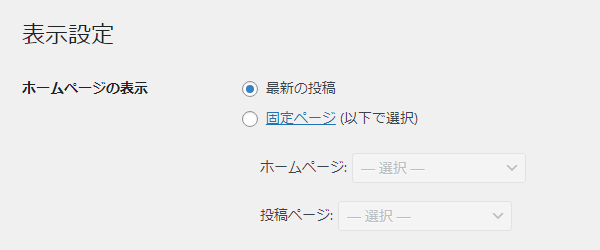
最新の投稿にチェックが入った状態です。
(2)「固定ページ」で、ホームページ=新規ページ1 投稿ページ=未設定
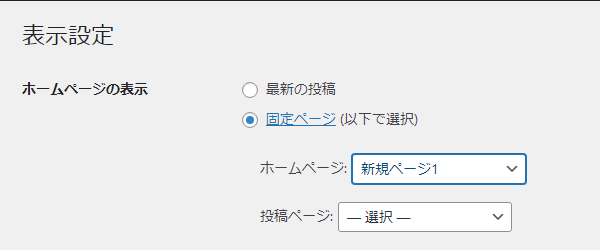
固定ページにチェックを入れて、ホームページに新規ページ1を設定しました。
投稿ページはいじっていません。
(3)「固定ページ」で、ホームページ=未設定 投稿ページ=新規ページ1
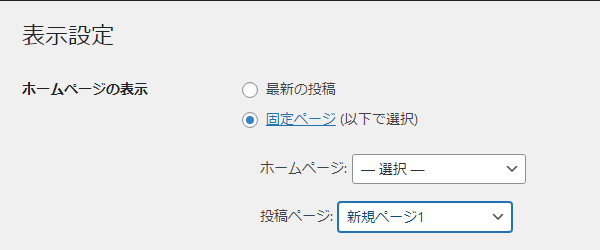
固定ページにチェックを入れて、投稿ページに新規ページ1を設定しました。
ホームページはいじっていません。
(4)「固定ページ」で、ホームページ=新規ページ1 投稿ページ=新規ページ2
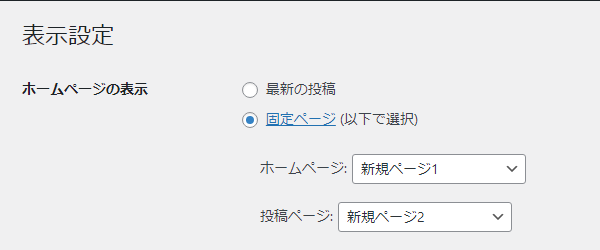
固定ページにチェックを入れて、ホームページに新規ページ1、投稿ページに新規ページ2を設定しました。
(5)「固定ページ」で、ホームページ=新規ページ1 投稿ページ=新規ページ1(同一ページ指定)
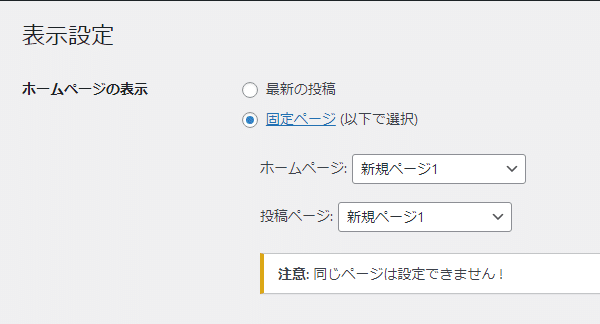
固定ページにチェックを入れて、ホームページに新規ページ1、投稿ページに新規ページ1を設定しました。
「注意: 同じページは設定できません !」という警告文が出ますが、設定保存は可能です。
このパターンも試してみました。
Aパターン front-page.php=有 home.php=有
(A-1)「最新の投稿」
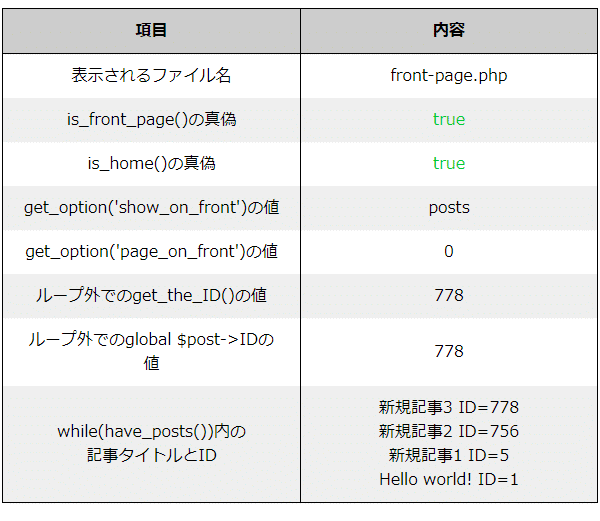
| 項目 | 内容 |
|---|---|
| 表示されるファイル名 | front-page.php |
| is_front_page()の真偽 | true |
| is_home()の真偽 | true |
| get_option(‘show_on_front’)の値 | posts |
| get_option(‘page_on_front’)の値 | 0 |
| ループ外でのget_the_ID()の値 | 778 |
| ループ外でのglobal $post->IDの値 | 778 |
| while(have_posts())内の 記事タイトルとID |
新規記事3 ID=778 新規記事2 ID=756 新規記事1 ID=5 Hello world! ID=1 |
(A-2)「固定ページ」で、ホームページ=新規ページ1 投稿ページ=未設定
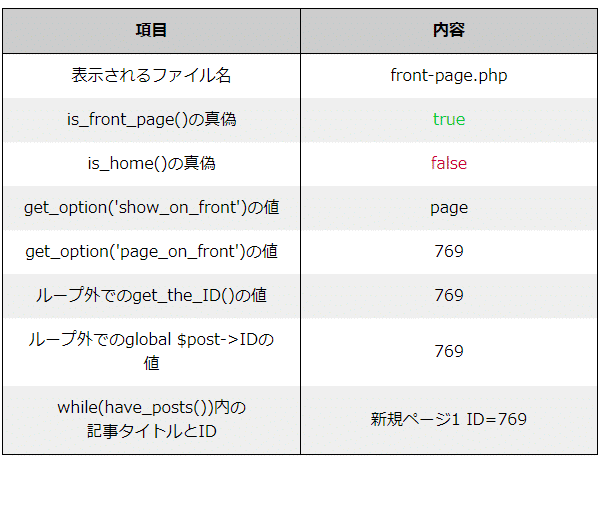
| 項目 | 内容 |
|---|---|
| 表示されるファイル名 | front-page.php |
| is_front_page()の真偽 | true |
| is_home()の真偽 | false |
| get_option(‘show_on_front’)の値 | page |
| get_option(‘page_on_front’)の値 | 769 |
| ループ外でのget_the_ID()の値 | 769 |
| ループ外でのglobal $post->IDの値 | 769 |
| while(have_posts())内の 記事タイトルとID |
新規ページ1 ID=769 |
(A-3)「固定ページ」で、ホームページ=未設定 投稿ページ=新規ページ1
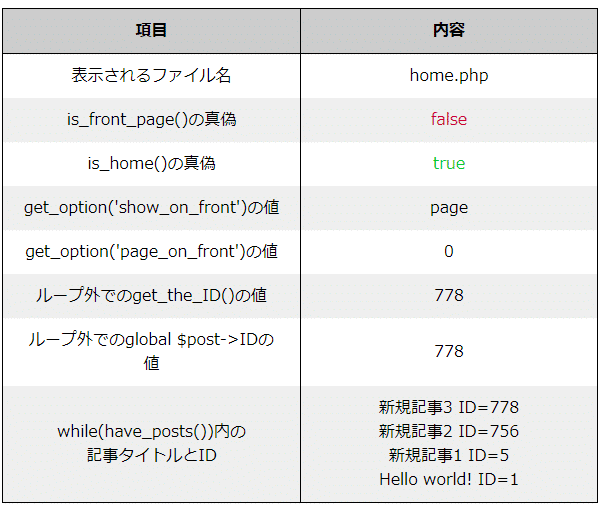
| 項目 | 内容 |
|---|---|
| 表示されるファイル名 | home.php |
| is_front_page()の真偽 | false |
| is_home()の真偽 | true |
| get_option(‘show_on_front’)の値 | page |
| get_option(‘page_on_front’)の値 | 0 |
| ループ外でのget_the_ID()の値 | 778 |
| ループ外でのglobal $post->IDの値 | 778 |
| while(have_posts())内の 記事タイトルとID |
新規記事3 ID=778 新規記事2 ID=756 新規記事1 ID=5 Hello world! ID=1 |
ここではfront-page.phpがあってもhome.phpが選択されています。
(A-4)「固定ページ」で、ホームページ=新規ページ1 投稿ページ=新規ページ2
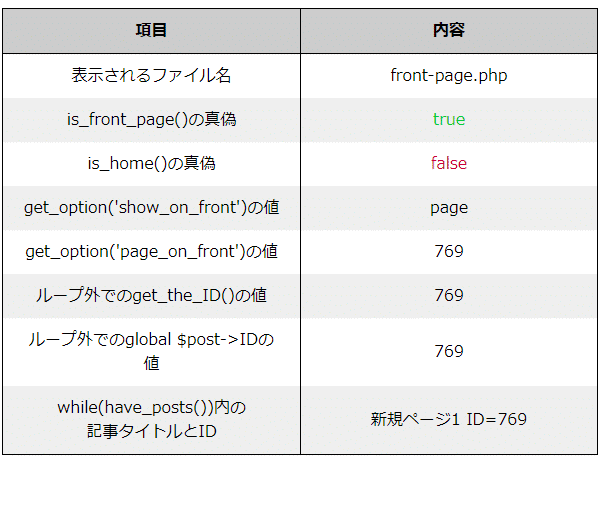
| 項目 | 内容 |
|---|---|
| 表示されるファイル名 | front-page.php |
| is_front_page()の真偽 | true |
| is_home()の真偽 | false |
| get_option(‘show_on_front’)の値 | page |
| get_option(‘page_on_front’)の値 | 769 |
| ループ外でのget_the_ID()の値 | 769 |
| ループ外でのglobal $post->IDの値 | 769 |
| while(have_posts())内の 記事タイトルとID |
新規ページ1 ID=769 |
(A-5)「固定ページ」で、ホームページ=新規ページ1 投稿ページ=新規ページ1(同一ページ指定)
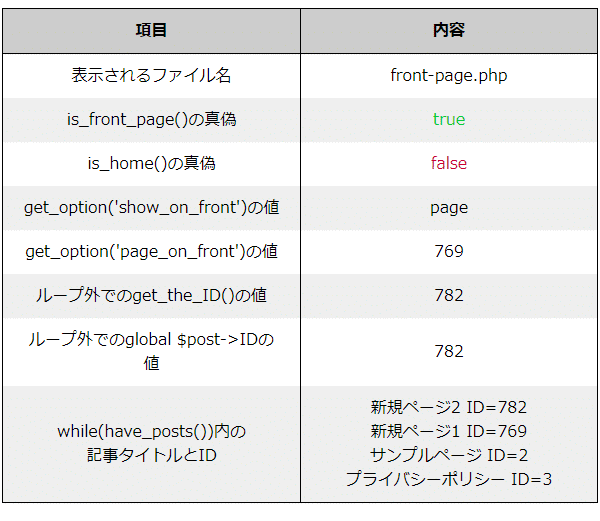
| 項目 | 内容 |
|---|---|
| 表示されるファイル名 | front-page.php |
| is_front_page()の真偽 | true |
| is_home()の真偽 | false |
| get_option(‘show_on_front’)の値 | page |
| get_option(‘page_on_front’)の値 | 769 |
| ループ外でのget_the_ID()の値 | 782 |
| ループ外でのglobal $post->IDの値 | 782 |
| while(have_posts())内の 記事タイトルとID |
新規ページ2 ID=782 新規ページ1 ID=769 サンプルページ ID=2 プライバシーポリシー ID=3 |
Bパターン front-page.php=有 home.php=無
(B-1)「最新の投稿」
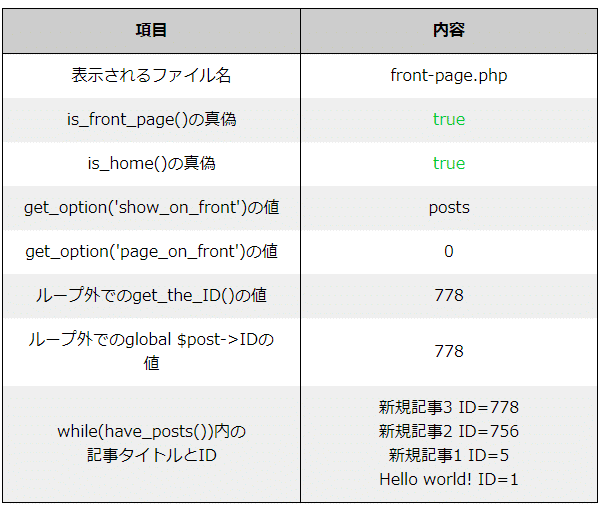
| 項目 | 内容 |
|---|---|
| 表示されるファイル名 | front-page.php |
| is_front_page()の真偽 | true |
| is_home()の真偽 | true |
| get_option(‘show_on_front’)の値 | posts |
| get_option(‘page_on_front’)の値 | 0 |
| ループ外でのget_the_ID()の値 | 778 |
| ループ外でのglobal $post->IDの値 | 778 |
| while(have_posts())内の 記事タイトルとID |
新規記事3 ID=778 新規記事2 ID=756 新規記事1 ID=5 Hello world! ID=1 |
(B-2)「固定ページ」で、ホームページ=新規ページ1 投稿ページ=未設定
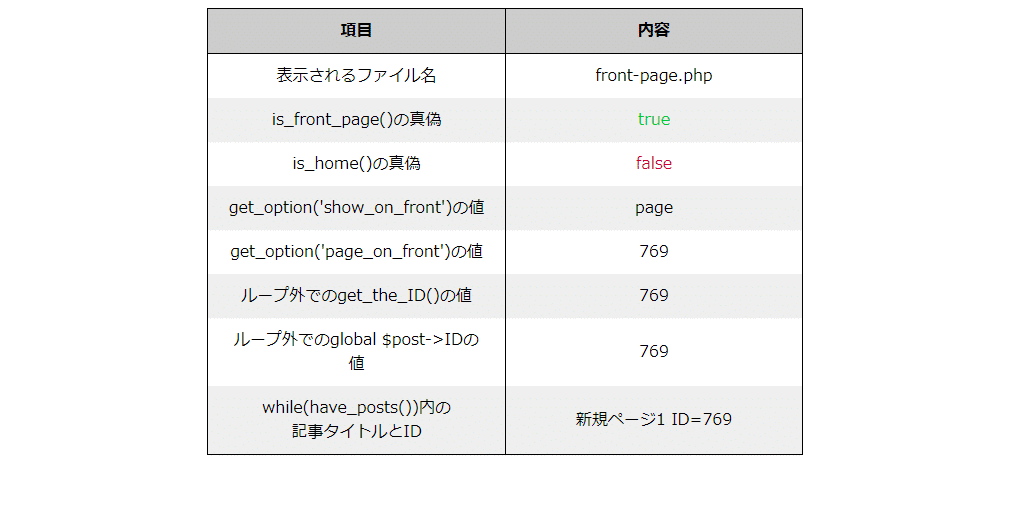
| 項目 | 内容 |
|---|---|
| 表示されるファイル名 | front-page.php |
| is_front_page()の真偽 | true |
| is_home()の真偽 | false |
| get_option(‘show_on_front’)の値 | page |
| get_option(‘page_on_front’)の値 | 769 |
| ループ外でのget_the_ID()の値 | 769 |
| ループ外でのglobal $post->IDの値 | 769 |
| while(have_posts())内の 記事タイトルとID |
新規ページ1 ID=769 |
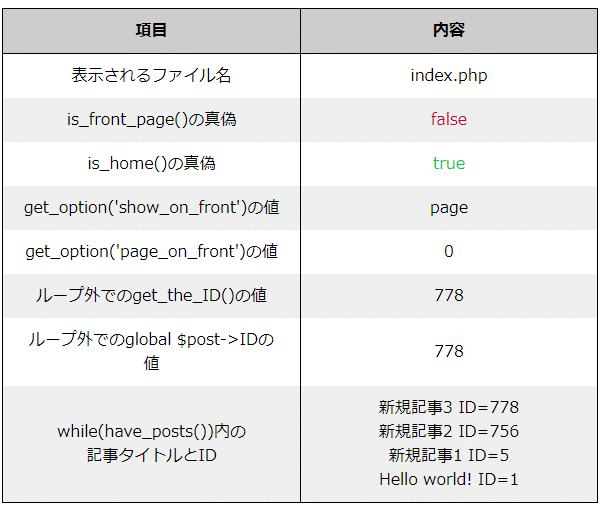
(B-3)「固定ページ」で、ホームページ=未設定 投稿ページ=新規ページ1
| 項目 | 内容 |
|---|---|
| 表示されるファイル名 | index.php |
| is_front_page()の真偽 | false |
| is_home()の真偽 | true |
| get_option(‘show_on_front’)の値 | page |
| get_option(‘page_on_front’)の値 | 0 |
| ループ外でのget_the_ID()の値 | 778 |
| ループ外でのglobal $post->IDの値 | 778 |
| while(have_posts())内の 記事タイトルとID |
新規記事3 ID=778 新規記事2 ID=756 新規記事1 ID=5 Hello world! ID=1 |
ここではfront-page.phpがあってもindex.phpが選択されています。
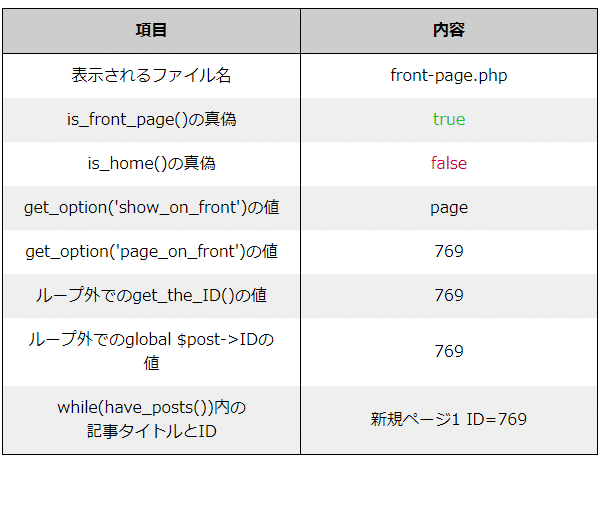
(B-4)「固定ページ」で、ホームページ=新規ページ1 投稿ページ=新規ページ2
| 項目 | 内容 |
|---|---|
| 表示されるファイル名 | front-page.php |
| is_front_page()の真偽 | true |
| is_home()の真偽 | false |
| get_option(‘show_on_front’)の値 | page |
| get_option(‘page_on_front’)の値 | 769 |
| ループ外でのget_the_ID()の値 | 769 |
| ループ外でのglobal $post->IDの値 | 769 |
| while(have_posts())内の 記事タイトルとID |
新規ページ1 ID=769 |
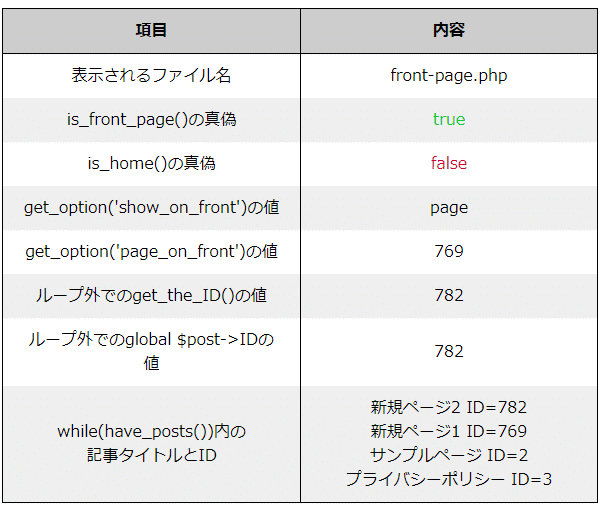
(B-5)「固定ページ」で、ホームページ=新規ページ1 投稿ページ=新規ページ1(同一ページ指定)
| 項目 | 内容 |
|---|---|
| 表示されるファイル名 | front-page.php |
| is_front_page()の真偽 | true |
| is_home()の真偽 | false |
| get_option(‘show_on_front’)の値 | page |
| get_option(‘page_on_front’)の値 | 769 |
| ループ外でのget_the_ID()の値 | 782 |
| ループ外でのglobal $post->IDの値 | 782 |
| while(have_posts())内の 記事タイトルとID |
新規ページ2 ID=782 新規ページ1 ID=769 サンプルページ ID=2 プライバシーポリシー ID=3 |
Cパターン front-page.php=無 home.php=有
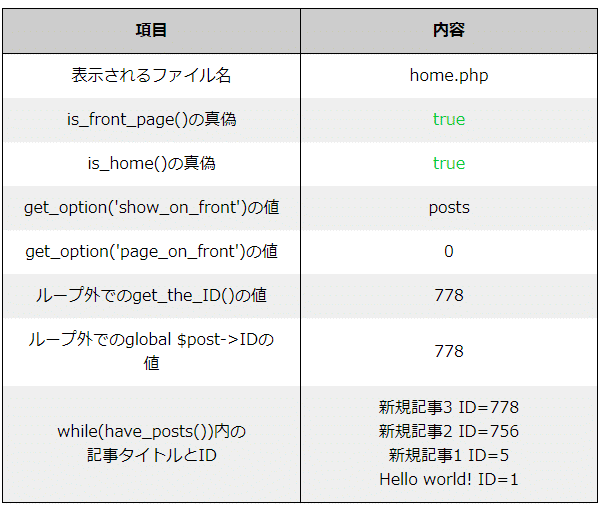
(C-1)「最新の投稿」
| 項目 | 内容 |
|---|---|
| 表示されるファイル名 | home.php |
| is_front_page()の真偽 | true |
| is_home()の真偽 | true |
| get_option(‘show_on_front’)の値 | posts |
| get_option(‘page_on_front’)の値 | 0 |
| ループ外でのget_the_ID()の値 | 778 |
| ループ外でのglobal $post->IDの値 | 778 |
| while(have_posts())内の 記事タイトルとID |
新規記事3 ID=778 新規記事2 ID=756 新規記事1 ID=5 Hello world! ID=1 |
(C-2)「固定ページ」で、ホームページ=新規ページ1 投稿ページ=未設定
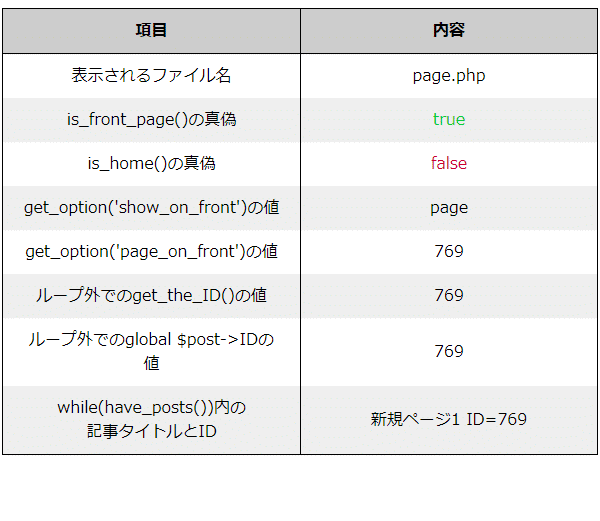
| 項目 | 内容 |
|---|---|
| 表示されるファイル名 | page.php |
| is_front_page()の真偽 | true |
| is_home()の真偽 | false |
| get_option(‘show_on_front’)の値 | page |
| get_option(‘page_on_front’)の値 | 769 |
| ループ外でのget_the_ID()の値 | 769 |
| ループ外でのglobal $post->IDの値 | 769 |
| while(have_posts())内の 記事タイトルとID |
新規ページ1 ID=769 |
(C-3)「固定ページ」で、ホームページ=未設定 投稿ページ=新規ページ1
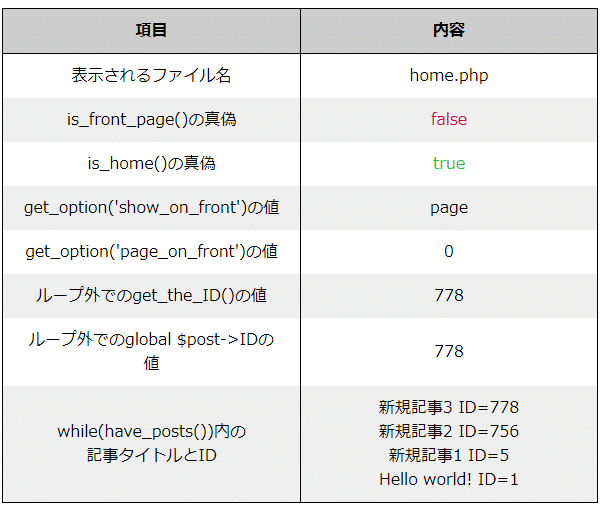
| 項目 | 内容 |
|---|---|
| 表示されるファイル名 | home.php |
| is_front_page()の真偽 | false |
| is_home()の真偽 | true |
| get_option(‘show_on_front’)の値 | page |
| get_option(‘page_on_front’)の値 | 0 |
| ループ外でのget_the_ID()の値 | 778 |
| ループ外でのglobal $post->IDの値 | 778 |
| while(have_posts())内の 記事タイトルとID |
新規記事3 ID=778 新規記事2 ID=756 新規記事1 ID=5 Hello world! ID=1 |
(C-4)「固定ページ」で、ホームページ=新規ページ1 投稿ページ=新規ページ2
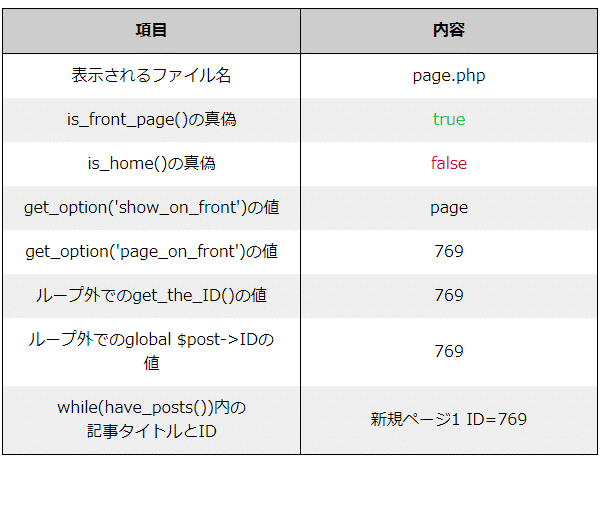
| 項目 | 内容 |
|---|---|
| 表示されるファイル名 | page.php |
| is_front_page()の真偽 | true |
| is_home()の真偽 | false |
| get_option(‘show_on_front’)の値 | page |
| get_option(‘page_on_front’)の値 | 769 |
| ループ外でのget_the_ID()の値 | 769 |
| ループ外でのglobal $post->IDの値 | 769 |
| while(have_posts())内の 記事タイトルとID |
新規ページ1 ID=769 |
(C-5)「固定ページ」で、ホームページ=新規ページ1 投稿ページ=新規ページ1(同一ページ指定)
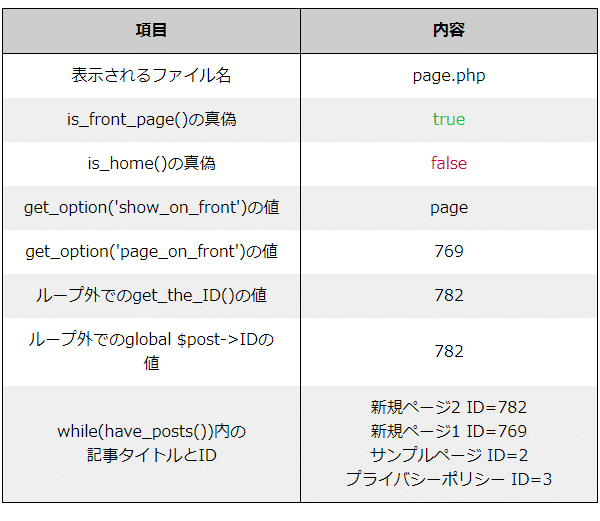
| 項目 | 内容 |
|---|---|
| 表示されるファイル名 | page.php |
| is_front_page()の真偽 | true |
| is_home()の真偽 | false |
| get_option(‘show_on_front’)の値 | page |
| get_option(‘page_on_front’)の値 | 769 |
| ループ外でのget_the_ID()の値 | 782 |
| ループ外でのglobal $post->IDの値 | 782 |
| while(have_posts())内の 記事タイトルとID |
新規ページ2 ID=782 新規ページ1 ID=769 サンプルページ ID=2 プライバシーポリシー ID=3 |
Dパターン front-page.php=無 home.php=無
(D-1)「最新の投稿」
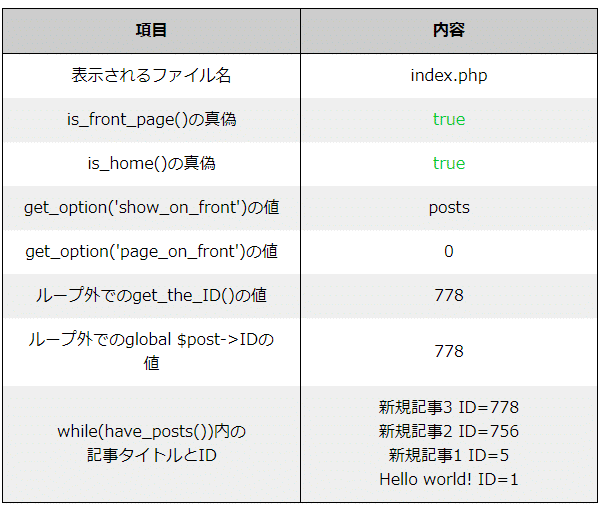
| 項目 | 内容 |
|---|---|
| 表示されるファイル名 | index.php |
| is_front_page()の真偽 | true |
| is_home()の真偽 | true |
| get_option(‘show_on_front’)の値 | posts |
| get_option(‘page_on_front’)の値 | 0 |
| ループ外でのget_the_ID()の値 | 778 |
| ループ外でのglobal $post->IDの値 | 778 |
| while(have_posts())内の 記事タイトルとID |
新規記事3 ID=778 新規記事2 ID=756 新規記事1 ID=5 Hello world! ID=1 |
(D-2)「固定ページ」で、ホームページ=新規ページ1 投稿ページ=未設定
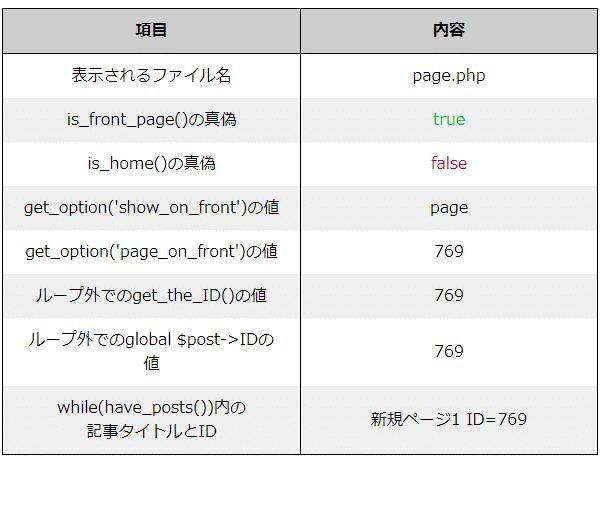
| 項目 | 内容 |
|---|---|
| 表示されるファイル名 | page.php |
| is_front_page()の真偽 | true |
| is_home()の真偽 | false |
| get_option(‘show_on_front’)の値 | page |
| get_option(‘page_on_front’)の値 | 769 |
| ループ外でのget_the_ID()の値 | 769 |
| ループ外でのglobal $post->IDの値 | 769 |
| while(have_posts())内の 記事タイトルとID |
新規ページ1 ID=769 |
(D-3)「固定ページ」で、ホームページ=未設定 投稿ページ=新規ページ1
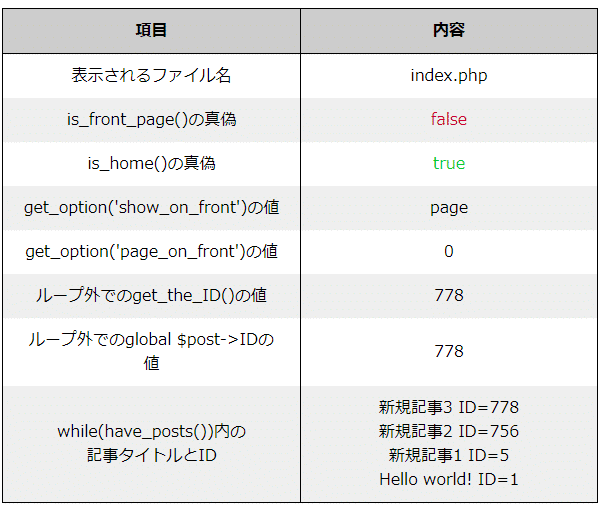
| 項目 | 内容 |
|---|---|
| 表示されるファイル名 | index.php |
| is_front_page()の真偽 | false |
| is_home()の真偽 | true |
| get_option(‘show_on_front’)の値 | page |
| get_option(‘page_on_front’)の値 | 0 |
| ループ外でのget_the_ID()の値 | 778 |
| ループ外でのglobal $post->IDの値 | 778 |
| while(have_posts())内の 記事タイトルとID |
新規記事3 ID=778 新規記事2 ID=756 新規記事1 ID=5 Hello world! ID=1 |
(D-4)「固定ページ」で、ホームページ=新規ページ1 投稿ページ=新規ページ2
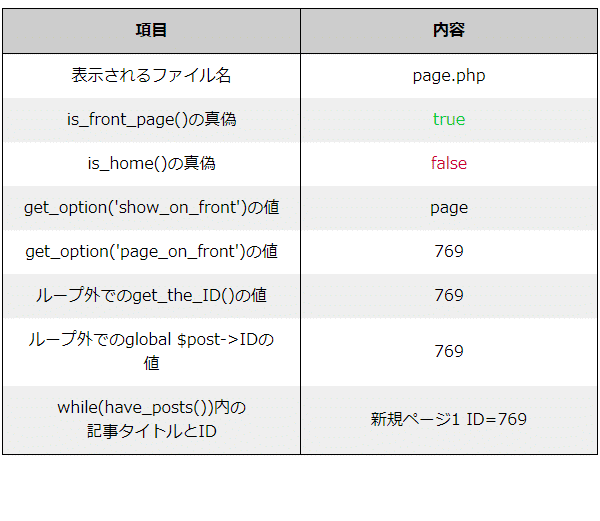
| 項目 | 内容 |
|---|---|
| 表示されるファイル名 | page.php |
| is_front_page()の真偽 | true |
| is_home()の真偽 | false |
| get_option(‘show_on_front’)の値 | page |
| get_option(‘page_on_front’)の値 | 769 |
| ループ外でのget_the_ID()の値 | 769 |
| ループ外でのglobal $post->IDの値 | 769 |
| while(have_posts())内の 記事タイトルとID |
新規ページ1 ID=769 |
(D-5)「固定ページ」で、ホームページ=新規ページ1 投稿ページ=新規ページ1(同一ページ指定)
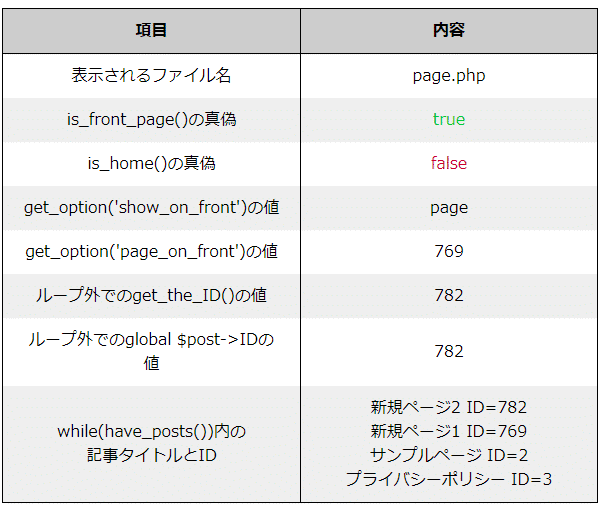
| 項目 | 内容 |
|---|---|
| 表示されるファイル名 | page.php |
| is_front_page()の真偽 | true |
| is_home()の真偽 | false |
| get_option(‘show_on_front’)の値 | page |
| get_option(‘page_on_front’)の値 | 769 |
| ループ外でのget_the_ID()の値 | 782 |
| ループ外でのglobal $post->IDの値 | 782 |
| while(have_posts())内の 記事タイトルとID |
新規ページ2 ID=782 新規ページ1 ID=769 サンプルページ ID=2 プライバシーポリシー ID=3 |
まとめ
サイトのトップページにするようにfront-page.phpを作るっても(3)の時は無意味ってこと。
is_front_page()||is_home()の条件式でトップ表示をするのがいいみたい。

コメント